Administering the ActiveBatch System
This section is for ActiveBatch system administrators or those users who will be responsible for maintaining the ActiveBatch system itself.
An Administrator is charged with the responsibility for the proper installation and configuration of ActiveBatch, its overall maintenance, and determining how ActiveBatch Security will be set on the various object types that comprise the scheduling environment. Part of that security is the authorization of users and/or groups to the ActiveBatch system and the establishment of their roles (administrator, operator, developer). For example, what users and/or groups have permission to connect to the Job Scheduler and are allowed to add, modify, and delete objects.
Another important aspect to security is the creation of User Account objects. One key role User Accounts objects have is they provide security credentials for running jobs. Since ActiveBatch is a cross-platform product, these credentials are applicable to one or more machines and platforms. The username and password required as a job's execution credentials are stored in a User Account object. User Account objects are typically managed by an ActiveBatch Administrator. This includes creating the User Account object(s), specifying the username and password, then assigning security to the object that identifiers the users that are allowed to access (use) the User Account object(s). For example, every job must be assigned a User Account object. Therefore, job authors would need to be granted the "Use" access permission for the User Account object(s) they can associated to their jobs.
Another important aspect to managing the environment is the creation of Execution Queues. Each Execution Queue points to an Execution Agent system. Execution Agent systems are where ActiveBatch Jobs run. Since the Execution Agent is a licensed component, an ActiveBatch Administrator typically creates the Queues and tracks the licenses being used for the Agent installations. While there are licensing options for unlimited Execution Agent installations, or licensing a virtual machine 'Host' system, many customers opt to purchase a set amount of Agent license "points" (our "Classic" Agent licensing model). As Execution Agents are installed and Execution Queue objects are created to point to them, the license points are deducted from the total amount of license points.
Next, ActiveBatch Administrators typically create default policies and/or audit policies. See Default Policy and Audit Policy
Some of the topics mentioned above have been covered in other sections of the documentation. This section focuses on some of the Administrator topics you see in the Administrator folder in the image below.

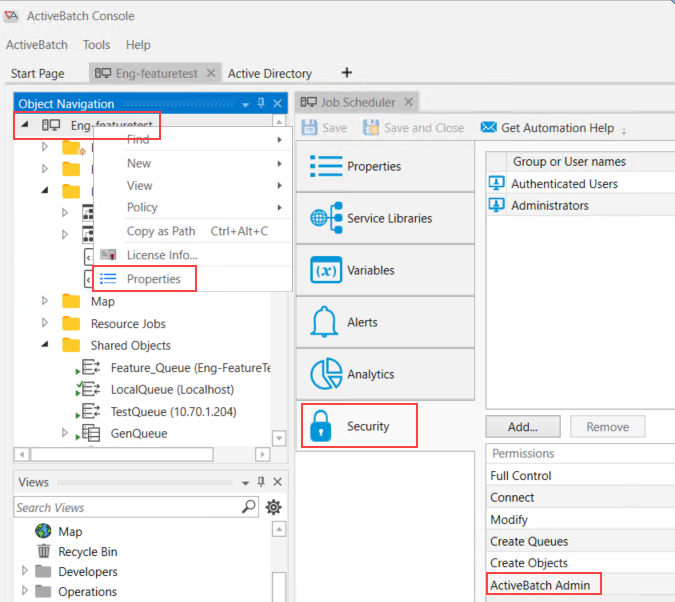
Note: You must be an “ActiveBatch Administrator” for each individual Job Scheduler you are connected on to be able to see Administrative information.
An ActiveBatch Administrator is a Scheduler-level security permission located on the Scheduler's Security Property sheet. To access this property sheet, right-click on the Scheduler server object in the Object Navigation pane, select Properties, then Security.